Wednesday, February 4, 2026

Saturday, January 31, 2026
Thursday, April 27, 2023
Photo Retouch in the Advertising Industry
Photo retouching has become a staple of the advertising industry. It is used to perfect and enhance the visuals of a product or service, and to create an attention-grabbing, aesthetically pleasing look. In an age of digital media, photo retouching can help a business to stand out from the competition and get noticed by potential customers.
What is Photo Retouching?
Photo retouching is the process of editing an image to enhance its appearance and make it more aesthetically pleasing. It is often used to remove blemishes, correct lighting and color issues, remove distracting elements and add special effects. Photo retouching helps to create an image that communicates the message of the advertisement in a more effective way.
What are the Benefits of Photo Retouching?
Photo retouching can help to turn an ordinary image into something extraordinary. By applying a few digital edits, a photo can be transformed into a work of art that draws in viewers and compels them to take action.
Photo retouching can also help to improve the quality of an image, making it appear more professional and polished. This can help to create a better impression of the product or service being advertised, and thus increase the chances of success for the advertisement.
How is Photo Retouching Used in the Advertising Industry?
Photo retouching is used extensively in the advertising industry, from creating print and digital advertisements to producing product packaging and television commercials.
Photo retouching can be used to create attention-grabbing visuals that draw in potential customers. It can be used to touch up and enhance images to make them look more professional and polished, as well as to remove distracting elements and add special effects.
Photo retouching can also be used to create composite images, which can be used to showcase a product in the best light. By combining multiple images together, a composite image can be created that shows the product or service in a more appealing way.
What are the Challenges of Photo Retouching?
Although photo retouching can help to create stunning visuals that draw in viewers, it can also be a challenge. It requires a good eye for composition, color, and lighting, as well as a strong understanding of digital editing software.
Photo retouching must also be done in a way that is ethical and responsible. It is important to ensure that any retouching is done in a way that does not deceive viewers or misrepresent the product or service being advertised.
Conclusion
Photo retouching is an essential part of the advertising industry. It can help to create stunning visuals that draw in viewers and compel them to take action. However, it is important to ensure that any retouching is done in an ethical and responsible way. With the right tools and skills, photo retouching can be used to create stunning visuals that can help to increase the success of an advertisement.
Saturday, April 15, 2023
05 Best Clipping Path Service Providers For 2023
Clipping path services refer to the process of removing the background of an image to isolate the subject. There are several companies and individuals that provide clipping path services, both online and offline.
Some popular clipping path service providers include:
01. Clipping Path India: This company provides clipping path services, image masking, and other photo editing services.
02. Clipping Path United: A company that offers a range of image editing services, including clipping path, background removal, and photo retouching.
03. Clipping Path Zone: A professional clipping path service provider that specializes in image editing for e-commerce, photography, and graphic design industries.
04. FixThePhoto: This company provides a wide range of photo editing services, including clipping paths, background removal, and image retouching.
05. Clipping USA: A company that provides high-quality clipping path services to clients all over the world.


When choosing a clipping path service provider, it's important to consider factors such as the quality of their work, turnaround time, pricing, and customer service. It's also a good idea to check out reviews and testimonials from previous clients to get an idea of their experience with the provider.
Which is clipping path industry best in USA?

1. 1. Quality of work: Look for companies that have a portfolio of high-quality work and have a reputation for producing clean and accurate clipping paths.
Some of the top clipping path companies in the USA include Clipping Path India, Clipping Path United, Clipping Path Specialist, and Clipping USA. However, it's important to do your own research and compare different companies to find the one that best meets your needs.
How to Find Best Clipping Path Service Provider in USA
How to Find Best Clipping Path Service Provider in USA, you should start by researching their reputation. Look for reviews and testimonials from current or past customers to get an idea of how satisfied they are with the quality of service provided.
Additionally, it’s important to determine how experienced a provider is in providing clipping path services and whether they have the necessary tools and expertise to complete your project effectively. Today we will discuss How to Find Best Clipping Path Service Provider in USA in this article.
You should also ask about turnaround times, pricing structures, customer support options, delivery methods, payment terms and any additional fees associated with using their services. Once you have narrowed down your list based on these criteria, contact each provider directly with any questions that you may have before making a final decision.
How to Find Best Clipping Path Service Provider in USA Online and online
- Step 1:
- Research the available clipping path service providers in the USA
- Search online using keywords such as “clipping path services” or “clipping path service provider
- Look for reviews and ratings to get an idea of what other people think about a particular company
- Step 2:
- Compare different companies and their services
- Check out their portfolio, pricing, turnaround time and customer support policies
- Read through customer testimonials to gauge how satisfied customers are with each company’s services
- Step 3:
- Reach out to a few companies that you’re interested in working with
- Ask them questions regarding their experience level, capabilities and any additional features they may offer that sets them apart from others in the industry
- This can help narrow down your options further so that you make an informed decision when choosing the best clipping path service provider for your needs
- Step 4:
- Make sure that you ask for quotes from all of the potential partners before making your final decision on which one to hire
- Evaluate how much value each partner offers compared to cost so that you can find the best deal possible without compromising on the quality of work delivered by them
How Do I Choose the Best Clipping Path Service Provider?
Choosing the best clipping path service provider can be a difficult decision. Here are some key points to consider How to Find Best Clipping Path Service Provider in USA:
- Quality: Look for experienced professionals who provide high-quality work and guarantee customer satisfaction.
- Price: Compare rates between different companies to get the most competitive price without sacrificing quality.
- Turnaround time: Ask about turnaround times and make sure they are realistic and achievable for your needs.
- Communication: Make sure you have good communication with the company so that requests, changes, and updates can be handled efficiently.
By following these tips, you’ll be able to find the best clipping path service provider for your project requirements.
What is the Best Clipping Service?
The best clipping service is one that provides fast, accurate results at a reasonable price. Here are some of the key features to look for when choosing a clipping service:
- Quality output: Ensure that the final result looks professional and free from any errors.
- Fast turnaround time: Look for services that can deliver your images within an agreed timeframe.
- Affordable rates: Make sure you get the most value for money with competitive pricing.
- Reliability: Choose a provider who has a proven track record of delivering excellent results consistently over time.
Overall, finding the right clipping service requires research and comparison to make sure it meets your needs and budget.
How Do You Make a Perfect Clipping Path?
A perfect clipping path requires careful attention to detail and precision. Here are the steps you should take:
- Select your image using a clipping path tool such as Photoshop or Illustrator.
- Trace around the outline of the subject with a pen tool, making sure to follow all edges accurately. – Delete any unwanted parts of the background outside of this area.
- Adjust settings such as feathering and opacity levels to ensure an even transition between the object and its background.
Finally, save your work in an appropriate format for easy reuse later on!
Is Clipping Path the Same As Background Removal?
No, clipping path and background removal are not the same. Clipping path is a vector-based technique used to remove background from an image while keeping its edges sharp. Background removal is a pixel-based process used to alter or replace the existing background of an image.
The differences between clipping path and background removal include:
- Clipping Path keeps edges crisp while maintaining transparency, which allows for more accurate results;
- Background Removal involves replacing or changing the existing background of an image;
- Clipping Path requires manual selection whereas Background Removal can be done automatically via software tools.
E-commerce Image Editing Services

E-commerce Image Editing Services provide businesses with the opportunity to enhance their product images in order to draw more attention from customers. By using professional editing services, businesses can edit and optimize photos for maximum impact on online store platforms, ensuring that customers are presented with visually appealing images of products. This can result in increased sales as well as improved customer engagement and satisfaction levels.
Conclusion
Overall, it is clear How to Find Best Clipping Path Service Provider in USA can be a daunting task. However, by following the tips outlined in this blog post such as researching for reliable services and reviews, comparing quotes from different companies and considering their customer service policies, you should be able to make an informed decision about which clipping path service provider will best suit your needs. By using these simple methods, you can ensure that you get the highest quality results at an affordable price.
Clipping Path Service for E-commerce Site
Clipping Path Service for e-commerce sites is a digital image editing service used to isolate and remove the background of an image. It is also used to extract specific objects from images so they can be manipulated, resized, or moved in order to fit the desired layout of an online store. Clipping path services are usually done using vector-based software such as Adobe Illustrator, Photoshop or Inkscape.
This type of service allows designers to create high-quality web graphics by isolating certain elements of an image without having to recreate them entirely.
Clipping Path Service for E-commerce Site are a great way to enhance the visual appeal of your e-commerce site. By removing or replacing background elements, you can draw customers in with unique and eye-catching product images that help boost sales.
With professional clipping path tools and techniques, you can easily adjust image saturation, brightness, contrast and more for improved display on any device. This service is essential for creating attractive visuals that will make your products stand out from the competition.
Why Need Clipping Path Service for E-commerce Site?
Clipping Path Service for E-commerce Site is a great online resource for graphic designers, photographers and other creatives. It provides an easy-to-use platform where users can find quality clipping path services from around the world at competitive prices. With its user-friendly interface and quick turnaround time, it’s no wonder why the Clipping Path service has become a go-to source for high-quality clipping paths that are suitable for all types of projects.
Whether you need to cut out objects in photos or create intricate vector shapes, Clipping Path Service for E-commerce Site is sure to have the perfect solution for your needs!
Clipping Path United
Clipping Path United is a leading provider of image editing services, helping businesses and individuals around the world create visually stunning images. With years of experience in the industry, their team of highly-skilled professionals utilizes advanced technology to deliver quality results with lightning-fast turnaround times.

From basic clipping path services to complex retouching jobs, Clipping Path United ensures customer satisfaction by delivering exceptional service at an affordable price.
What is the Clipping path?
Clipping Path is a powerful and versatile technique used in the fields of graphic design, photography, and printing. It allows for the precise selection of an object or area within an image or photograph, enabling it to be removed from its background or edited separately. This method can also be used to create vector masks that are helpful when making graphics for print materials such as brochures and flyers.
Clipping Path service more precision than other methods like Photoshop’s Magic Wand tool and Lasso Tool which often result in jagged edges around objects being selected.
What is Clipping Path Service?
Clipping path service is a digital photo editing technique used to separate an object or subject from its background. It allows graphic designers and photographers to isolate elements in an image, such as text, logos, products, people or objects, so they can be edited independently of the rest of the image.

Clipping paths are typically created using vector tools such as Adobe Photoshop’s pen tool or Illustrator’s shape tools. The resulting path is then saved with the original file and can be used for various purposes including masking effects and creating composite images.
Who Needs Clipping Path Service?
Clipping path services are invaluable for any business that needs to accurately and precisely remove a background from an image. This type of service is especially useful for businesses like e-commerce websites, advertising agencies, magazines, newspapers, catalogs and product photography studios that need high-quality images with clean backgrounds for their products or advertisements. It can also be used by graphic designers to create logos or other graphics requiring a transparent background.
In addition to providing accurate background removal services, clipping paths can also help improve the overall quality of images by highlighting important elements within them.
Which is the Best Tool to Use for Clipping Path Work?
The best tool to use for clipping path work is Adobe Photoshop. This powerful and well-known image editing software offers a variety of tools that make creating high-quality clipping paths easy and efficient. With the Paths Tool, users can create precise selections by outlining objects or backgrounds with anchor points connected by smooth curves.
Additionally, Photoshop’s Quick Selection Tool allows users to quickly select areas of an image without having to trace over every single pixel manually. Furthermore, its Refine Edge feature enables even more precision when selecting difficult edges such as hair or fur. Overall, Adobe Photoshop provides all the necessary features for successful clipping path work and will yield professional results in no time!
What are the Advantages of a Clipping Path Service?

Clipping path services offer a number of advantages for businesses and individuals. Perhaps the most important advantage is that it allows you to remove any unwanted or distracting elements from an image without compromising its original quality. This can be extremely useful in product photography, where extra objects need to be removed from images before they are published online or printed.
Clipping paths also allow you to isolate specific areas of an image, so you can apply color corrections and effects on certain parts only. Additionally, this service enables businesses to cut out shapes with precision for use in promotional materials such as logos and flyers. Finally, clipping paths save time when compared to other methods of background removal like masking and retouching since the process is much faster and easier.
Conclusion
Overall, the use of a Clipping Path Service for an e-commerce site is a great way to improve product images and make them look more professional. This service can help take pictures from drab to fab with little effort or cost involved. It is easy to integrate into existing image management systems and can be done quickly depending on the complexity of the picture.
With its many advantages, it’s no wonder why so many e-commerce sites are choosing this service as their go-to solution for high-quality visuals.
Professional E-commerce Product Clipping Path Service
E-commerce product clipping path service is a process of isolating an image from its background, to create a clean cut-out. This allows the subject or object in the photo to be removed and placed on any type of background desired. The e-commerce product clipping path service makes it possible for online stores and other businesses to present their products in the best light by quickly creating high-quality images with no distractions from unwanted elements.
It is used for everything from creating product photos for websites, catalogs, brochures, advertisements and more. Advantages include improved accuracy when working with complex shapes around edges, better control over colors and tones when preparing images for print or web use, and faster turnaround times due to the automation of processes involved in manual masking techniques such as using Photoshop pen tools.
The E-commerce product clipping path service is an invaluable tool for online retailers. It allows them to quickly and easily remove backgrounds from images of their products, making it easier to display them on websites or in print media. Using this service can help a business save time and money, as well as ensure that their product images look professional and attractive.
This can be especially useful when selling complex items like electronics or jewelry, where the details need to be highlighted in order for potential customers to make informed decisions about purchasing the item.
What is Clipping Path Service?
Clipping path service is a process of outlining an image or parts of an image in order to remove the background, change it, or make certain elements within the photo more visible. It’s typically used for product photography, but can also be applied to images such as logos and illustrations. The outline created is known as a clipping path and is done using specialized software such as Adobe Photoshop.
Once complete, this allows you to manipulate your image without affecting other parts of it and helps you create the perfect visuals for your marketing needs.

What is the Best Clipping Service?
The best clipping service is one that offers quality services such as accurate and consistent image editing, fast delivery, unlimited revisions, and excellent customer support. One of the top-rated clipping services in the market today is Clipping Path Specialists (CPS). This company provides high-quality and cost-effective solutions for various types of photo editing needs.
They offer a wide range of services including background removal, deep etching product shots, color correction, masking images with transparency effects and more. Moreover, they guarantee quick turnaround times while delivering quality results every time. Their team consists of experienced graphic designers who are highly skilled at creating stunning visuals with Adobe Photoshop tools to ensure that you get exceptional-looking photos after their work has been completed.
Who Needs E-commerce Product Clipping Path Service?
Clipping Path Service is a widely used digital imaging technique that helps businesses, photographers and graphic designers to remove backgrounds from images or isolate objects of interest. It can be used for product photography, e-commerce websites, magazine layout design, book covers and more. Clipping Path Services are beneficial because they help make the image stand out by removing any unwanted distractions from the background.
Additionally, clipping paths allow for precise control on how much of an image you want to keep or remove – allowing for more creativity when creating designs. With its flexibility and accuracy, it’s no wonder that many industries have come to rely on this service as part of their workflow.
What are Image Clipping Path And Clipping Path Services?

Clipping path services, also known as image clipping paths, are graphics editing techniques used to separate an image from its background. This is done by creating paths around the object in the image that can then be cut away and replaced with another background. Clipping paths allow for more control over how objects appear on screen, enabling a higher level of realism and visual appeal.
They can also be used to create complex masking effects when working with photos and other digital images. The process involves using vector-based tools such as Adobe Photoshop or Illustrator to select specific areas of an image before making precise adjustments to achieve the desired results. Clipping path services offer enhanced flexibility over traditional photo manipulation techniques while still providing excellent quality output.
Conclusion
In conclusion, E-commerce Product Clipping Path Service is a critical aspect of any e-commerce business. It allows businesses to create visually appealing product images that are more likely to convert customers into buyers. This service also helps ensure products look their best and make the overall customer experience better.
With this in mind, it’s important for e-commerce businesses to invest in quality E-commerce Product Clipping Path Services so they can make sure their products stand out from the competition.
Tuesday, May 22, 2018
How to: Remove Green Screen Background in Photoshop
- Open up your green screen background image
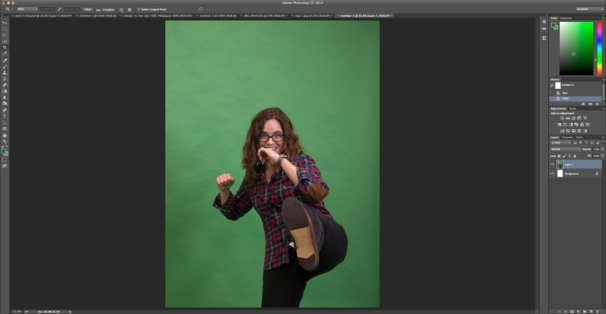
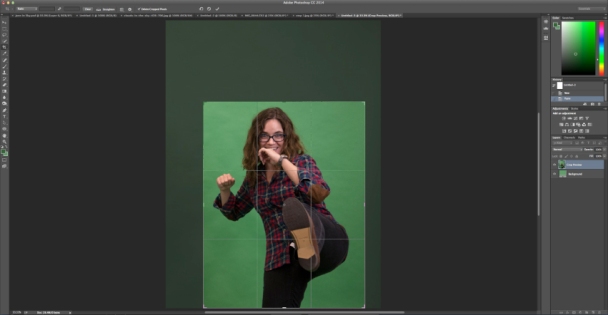
- Use the crop tool to remove any unwanted items in the image and/or simply crop out excess space. Click the checkmark or press ENTER when you’re done.
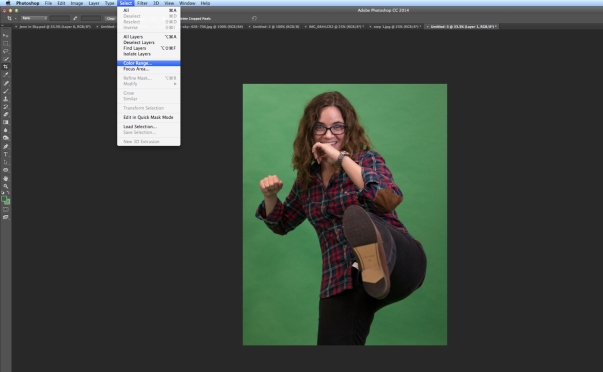
- Go to Select and click Color Range.
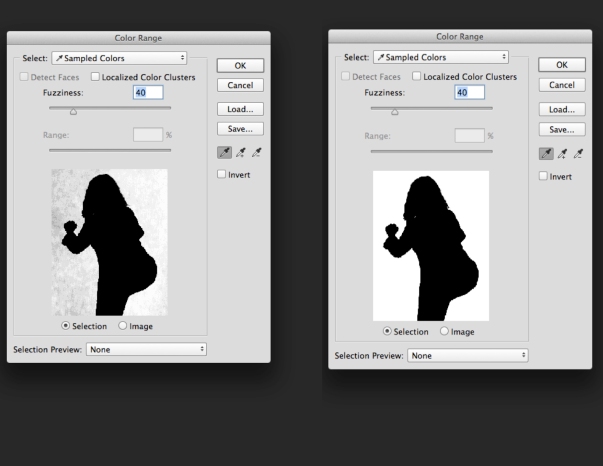
- Use the eyedropper tool that appears, hold down the SHIFT key while clicking and dragging around the green areas you need to remove, ideally the background in the popup color range box should become white. If you think you’ve removed too much, hold down the ALT key and click on the area where you want to deselect. Click OK when you are happy with the selection.
- Go to the Select and choose Inverse.
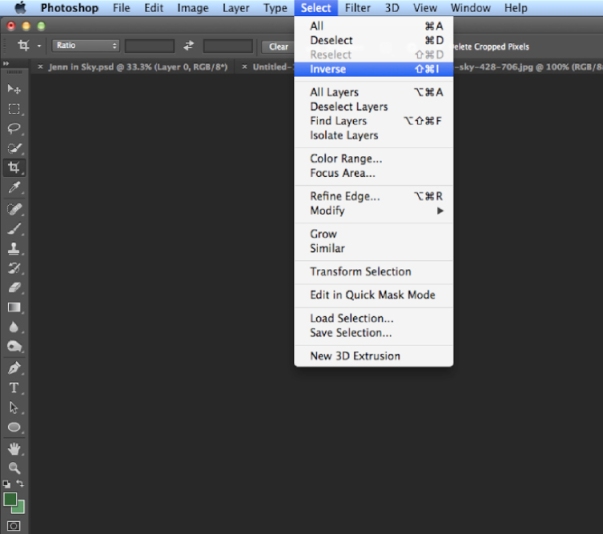 <
< - Go to Select again and click Refine Edge…
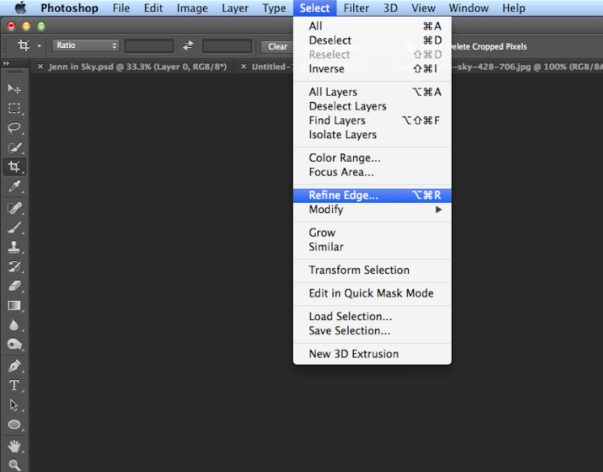
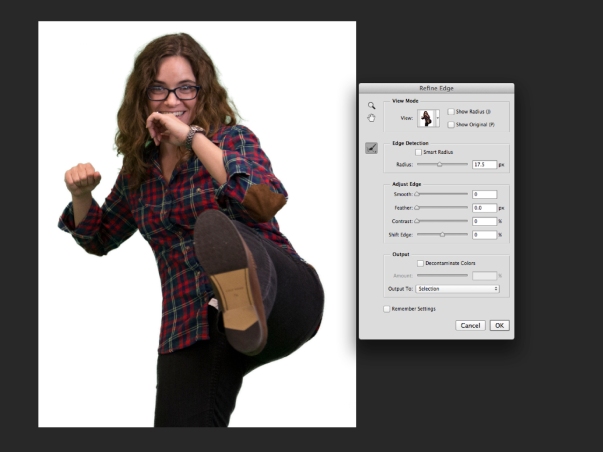
- Use the various sliders to adjust the smoothness of the edge of your cutout. Select OK when you are happy with how the selection looks in the preview. You can also click on the image and drag on any remaining green shades to fade it out.
- Go to Select and click Inverse, again.
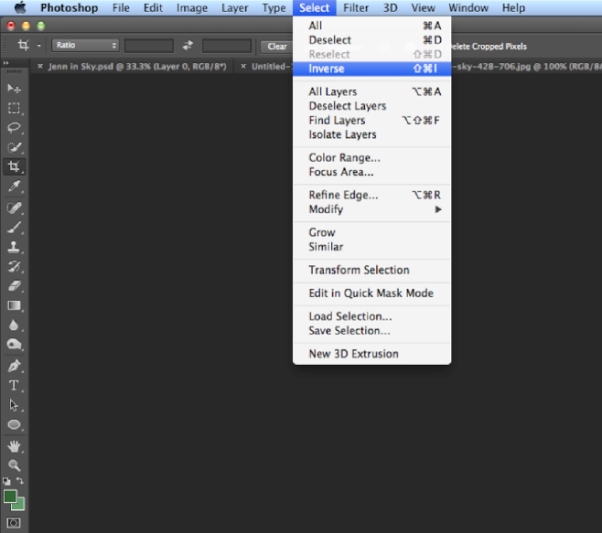
- Press the DELETE or BACKSPACE button on your keyboard to delete the green background.
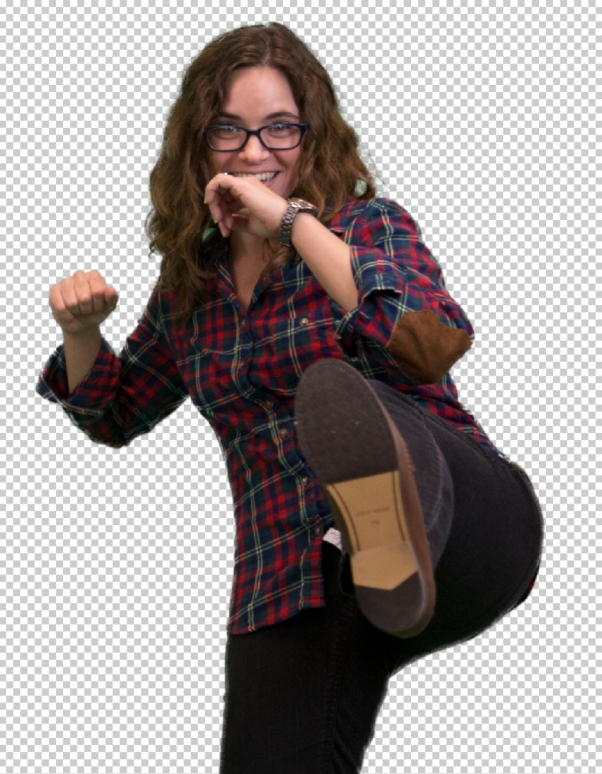
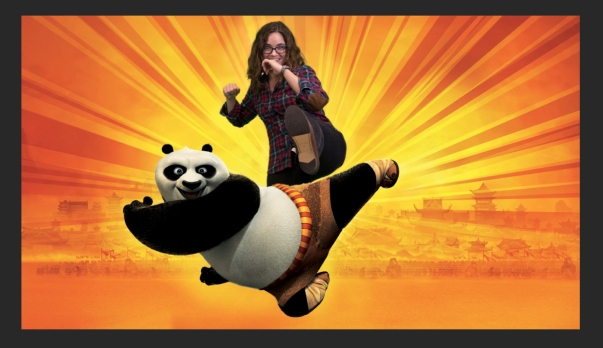
- Drag or copy and paste your image into a background you want, have fun!


Learn how to retouch your product shots in Photoshop
In this tutorial, we show you how to clean up and retouch photos of products to a professional standard
Advertising campaigns attract consumers to the professional images of their products. With all commercial photography, it is an important step to ensure each image as a good quality and high standard for print. Using software such as Photoshop in such industries and using similar tools and techniques, one professional results can easily be obtained at home using your own photographs.
In this tutorial, we would like to show you that using Photoshop CS8 to improve a product shot like the professionals and the image of a bottle of perfume shot. Glass objects can be extremely difficult to light and photograph, with distracting reflections and refractions, which can often prove to be difficult to improve or remove post-production. However, by using some simple adjustment techniques in Photoshop, we will show you how to correct, improve and enhance your shots, improve the overall image exposure and contrast as well as insert unwanted colors and remove dust particles For, to see as consumers again
Follow with our simple step-by-step guide and implement some of our basic improvement tips, which can help you get high-quality product shots results that will not appear in the portfolio of any of the profiles.
Step 1: Create a new layer

Open up your product photo file in Photoshop. In the Layers palette, duplicate the original layer by Ctrl/right-clicking on the Background layer and selecting Duplicate Layer. Rename this new layer ‘Exposure correction’.
Step 2: Cropping in

Select the Crop tool from the Tools bar and click on the top corner of the image, dragging the crop cursor diagonally down to the opposite bottom corner. Holding the Shift key to keep the original proportions, pull up the bottom corner cursor, cropping out the edges until you’re happy with the position of the perfume bottle in the frame.
Step 3: Adjust levels

Open a Levels adjustment layer to make corrections to the overall image exposure (Image>Adjustments>Levels). Begin by pulling in the slider on the left-hand side (Highlights) of the histogram to where the mountainous range begins to gain height. Now move the midpoint (greys) slider along to create a punchier contrast.
Step 4: Clean up

Now create another new layer titled ‘Clean-up layer’ and select the Clone Stamp tool that is located in the Tools bar. Adjust the brush settings so it has soft edges and is sized proportionately to the dust spots that you want to remove (you may need to alter this as you go). Keep the Opacity at 100%.
Step 5: Cloning out

Zoom in to check for obvious marks and spots. Using the correctly sized Clone Stamp tool select the area next to the mark; holding down the Opt/Alt key to select the clean area (for each flaw), place the cursor over the mark you wish to remove and press down to clone it out.
Step 6: Masking

For harder-to-remove dust marks on reflective surfaces cut out the area using the Quick Mask mode (press ‘Q’ on your keyboard for a shortcut). Select the Brush tool with 100% Opacity and paint the area, using the Eraser tool to correct any errors. Hit ‘Q’ to preview the selection line and, when happy, go to Layer>New>Layer via Copy (or Cmd/Ctrl+J) to create a cutout of what you have masked.
Step 7: Remove finer dust

Select your new cutout layer and go to Layer>Filter>Noise>Medium and blur the pixels with a 8px Radius, or thereabouts. Now adjust the Opacity of the layer to around 80%. Edit the layer by first selecting a Darken blending mode and then Linear Dodge (Add). You can reduce the overall layer opacity if you need to.
Step 8: Replace color

Even out the background colour by selecting Image>Adjustments>Replace Color. Use the Eyedropper tool and click on the darkest background area (eg the right-hand corner), drag the Lightness slider up to brighten out the dark regions and create an evenly white background. Make sure you zoom into your image and check that the white is the right brightness and blends with the already existing white background colour.
Step 9: Colour correction

Remove the warmer tones from the bottle and bring out the blues using the Color Balance adjustment layer (Image>Adjustments> Color Balance). Enable Preserve Luminosity and begin working your way through the sliders, adjusting through the Highlights, Midtones and Shadows. Continually toggle the Preview button on and off so that you can see the modified results as you go along. Remember, you don’t have to make adjustments with every slider; work gradually for best results.
Step 10: Final touchups

Zoom into your image and check for any unwanted marks you may have missed that still need to be cloned out. If you want to make further adjustments to the tonal range in the bottle use the Replace Color adjustment again and select a light blue area. Lighten this using the Lightness slider slowly to avoid cut-out-like results.
Step 11: Contrast and flatten

For a final contrast, boost the use a Shadows/Highlights adjustment layer. Really push the Midtone Contrast slider for the best results. When happy with the final look save the layered file separately as a PSD file in case you wish to go back and edit further. Now flatten your final image layers (Layer>Flatten Image).
Step 12: Sharpen up

Before you save your final image make sure it is sharp, adding definition to edges and improving the overall quality. Go to Filter> Sharpen>Unsharp Mask and activate the Preview button to monitor the effect. Up the Amount to 100% with Threshold at 0 levels and bring the Radius up slowly to around 2.6px.
Step 13: Resize

Now you’ve made the last tweaks you’ll want to resize it for web or print use. For a good-quality print, you will need to increase the image resolution to 300dpi (go to Image>Image Size>Resolution). For web use, decrease the resolution to a smaller value such as 72dpi.
Step 14: Saving

Remember to watermark your images before you upload them to ensure they are copyright protected. Once your work has been correctly resized to suit your output you should save the final image as a JPEG file (File>Save As>Format: JPEG) and then print out for your portfolio or upload it to your online gallery.
- For we offer the lowest price for product photo editing service
- We guarantee to produce the best results of the demands and requirements of our customers.
- We have gained a great understanding of the needs and requirements of our customers with the best service of thousands of client servers and background correction services worldwide.
- We offer a complimentary FREE TRIAL SERVICE for our customers, to ensure the quality and outlook of the product photo editing.
WHY PRODUCT PHOTOGRAPHY SHOULD BE A PRIORITY FOR YOUR BUSINESS
